Feed2JS の表示結果のタイトルに日付を表示する
フィードの内容をブログ等に表示するツール「Feed2JS」を使ったときに、タイトル横に日付を表示する方法です。
Feed2JS の詳細については、「RSS Feed(フィード)を表示する」をご覧ください。
下の例は、はてなブックマーク「最近の人気エントリー」のフィードを表示した場合の、変更前と変更後です。変更前はタイトル下に日付と時刻が表示されますが、変更後はタイトルの左に日付を表示します(いずれも設定項目の「Show item posting date? 」を「Yes」に設定)。
変更前
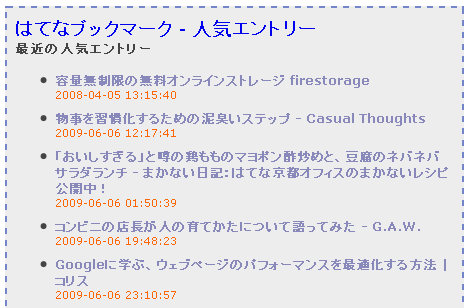
変更後
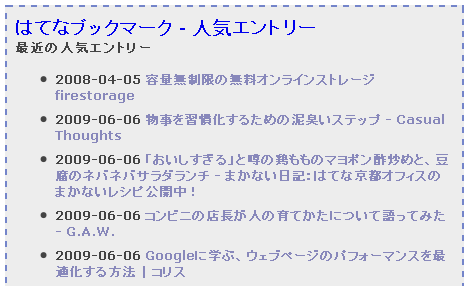
西暦を2桁表示することも可能です。
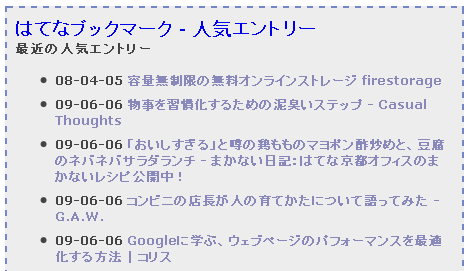
元のように、時刻も表示できます。
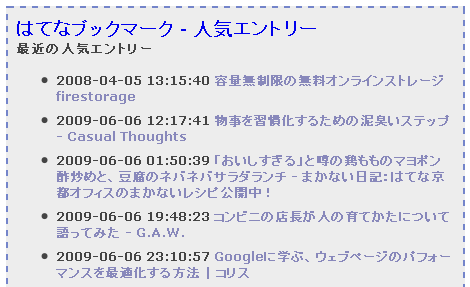
1.タイトル横に日付を適用する
自サーバにアップロードした feed2js ディレクトリ直下にある、feed2js.php の 200 行目あたり(確認バージョンは1.98)にある、下記の赤色部分を削除し、青色部分を追加します。バージョンによって行が異なる場合は似たような箇所をみつけてください。
変更前(赤色を削除)
...前略...
if ($desc < 0) {
$str.= "document.write('<li class=\"rss-item\">');\n";
} elseif ($item['title']) {
// format item title
$my_title = addslashes(strip_returns($item['title']));
// create a title attribute. thanks Seb!
$title_str = substr(addslashes(strip_returns(strip_tags((htmlspecialchars($item['summary']))))), 0, 255) . '...';
// write the title strng
$str.= "document.write('<li class=\"rss-item\"><a class=\"rss-item\" href=\"" . trim($my_url) . "\" title=\"$title_str\"". $target_window . '>' . $my_title . "</a><br />');\n";
} else {
// if no title, build a link to tag on the description
$str.= "document.write('<li class=\"rss-item\">');\n";
$more_link = " <a class=\"rss-item\" href=\"" . trim($my_url) . '"' . $target_window . ">«details»</a>";
}
// print out date if option indicated
if ($date == 'y') {
if ($tz == 'feed') {
// echo the date/time stamp reported in the feed
if ($item['pubdate'] != '') {
// RSS 2.0 is alreayd formatted, so just use it
$pretty_date = $item['pubdate'];
} elseif ($item['published'] != "") {
// ATOM 1.0 format, remove the "T" and "Z" and the time zone offset
$pretty_date = str_replace("T", " ", $item['published']);
$pretty_date= str_replace("Z", " ", $pretty_date);
} elseif ($item['issued'] != "") {
// ATOM 0.3 format, remove the "T" and "Z" and the time zone offset
$pretty_date = str_replace("T", " ", $item['issued']);
$pretty_date= str_replace("Z", " ", $pretty_date);
} elseif ( $item['dc']['date'] != "") {
// RSS 1.0, remove the "T" and the time zone offset
$pretty_date = str_replace("T", " ", $item['dc']['date']);
$pretty_date = substr($pretty_date, 0,-6);
} else {
// no time/date stamp,
$pretty_date = 'n/a';
}
} else {
// convert to local time via conversion to GMT + offset
// adjust local server time to GMT and then adjust time according to user
// entered offset.
$pretty_date = date($date_format, $item['date_timestamp'] - $tz_offset + $tz * 3600);
}
$str.= "document.write('<span class=\"rss-date\">$pretty_date</span><br />');\n";
}
// link to podcast media if availavle
...後略...変更後(青色を追加)
...前略...
if ($desc < 0) {
$str.= "document.write('<li class=\"rss-item\">');\n";
} elseif ($item['title']) {
// format item title
$my_title = addslashes(strip_returns($item['title']));
// create a title attribute. thanks Seb!
$title_str = substr(addslashes(strip_returns(strip_tags((htmlspecialchars($item['summary']))))), 0, 255) . '...';
// print out date if option indicated
if ($date == 'y') {
if ($tz == 'feed') {
// echo the date/time stamp reported in the feed
if ($item['pubdate'] != '') {
// RSS 2.0 is alreayd formatted, so just use it
$pretty_date = $item['pubdate'];
} elseif ($item['published'] != "") {
// ATOM 1.0 format, remove the "T" and "Z" and the time zone offset
$pretty_date = str_replace("T", " ", $item['published']);
$pretty_date= str_replace("Z", " ", $pretty_date);
} elseif ($item['issued'] != "") {
// ATOM 0.3 format, remove the "T" and "Z" and the time zone offset
$pretty_date = str_replace("T", " ", $item['issued']);
$pretty_date= str_replace("Z", " ", $pretty_date);
} elseif ( $item['dc']['date'] != "") {
// RSS 1.0, remove the "T" and the time zone offset
$pretty_date = str_replace("T", " ", $item['dc']['date']);
$pretty_date = substr($pretty_date, 0,-6);
} else {
// no time/date stamp,
$pretty_date = 'n/a';
}
} else {
// convert to local time via conversion to GMT + offset
// adjust local server time to GMT and then adjust time according to user
// entered offset.
$pretty_date = date($date_format, $item['date_timestamp'] - $tz_offset + $tz * 3600);
}
$pretty_date = substr($pretty_date, 0,-8);
}
// write the title strng
$str.= "document.write('<li class=\"rss-item\">$pretty_date <a class=\"rss-item\" href=\"" . trim($my_url) . "\" title=\"$title_str\"". $target_window . '>' . $my_title . "</a><br />');\n";
} else {
// if no title, build a link to tag on the description
$str.= "document.write('<li class=\"rss-item\">');\n";
$more_link = " <a class=\"rss-item\" href=\"" . trim($my_url) . '"' . $target_window . ">«details»</a>";
}
// link to podcast media if availavle
...後略...2.西暦を2桁にする
表示されている西暦を4桁から2桁にするには、1項で追加した、
$pretty_date = substr($pretty_date, 0,-8);を
$pretty_date = substr($pretty_date, 2,-8);に変更します。
3.時刻を表示する
時刻を表示するには、1項で追加した、
$pretty_date = substr($pretty_date, 0,-8);の1行を丸ごと削除してください。
- レビューツール
- svg画像表示ツール
- ブラウザから実行可能な画像形式一括変換ツール
- Feed2JS の表示結果の title 属性をカスタマイズする
- RSS Feed(フィード)を表示する(サービス利用編)
- RSS Feed(フィード)を表示する
はじめまして。
小枠空間様のFeed2JSを使用させていただいてます。
このFeed2JSを使って、新着の記事が分かるように「New!」マークみたいなものを表示させたいと思っています。
具体的には、
・10/12/09 今日もいい天気でした! [New!]
みたいな感じです。
ソースを見てみたのですが、ソースを見てもどこをどういじくったらいいのか分からず困っています。
どうすれば新着マークを表示できるようにできるでしょうか?
※phpが使えるサーバにアップしています。
いつもお世話になっています。出版物共に解りやすくて助かります。
恐れ入ります。古いエントリーであり、Feed2JSの事なので、見て頂けるか心配ですが、お力になって頂ければ幸いです。
表示を2010年02月21日とするには、どのようにしたら宜しいでしょうか?よろしくお願い致します。