Movable Type 4.3 の新機能(スタティックページのページ分割)
Movable Type 4.3b より、スタティックページのページ分割機能が追加されました。
具体的には、メインページやカテゴリアーカイブページの1ページ目はスタティックパブリッシングで出力するとともに、下の画像のようにページナビゲーションを表示し、2ページ目以降については、mt-search.cgi を使って表示します。

以下、下記の記事を元に、メインページとカテゴリアーカイブページのページ分割の設定方法について紹介します。
Movable Type 4.3b は以下のリンクからダウンロードできます。
以下の説明は、インストール時に言語から「日本語」を選択した状態で解説しています。英語版のまま使っている場合、画面の項目名は適宜読み直してください。
1.テンプレートモジュール「Search Pagination」の追加
ブログ記事の「デザイン」→「テンプレート」→「テンプレートモジュールを作成」をクリックして、「Search Pagination」という新しいテンプレートモジュールを作成します。テンプレートには以下の内容をペーストしてください。
<mt:If name="search_results">
<div class="content-nav">
<mt:IfPreviousResults><a href="<$mt:PreviousLink$>" rel="prev" onclick="return swapContent(-1);">< Previous</a> </mt:IfPreviousResults><mt:PagerBlock><mt:IfCurrentPage><$mt:Var name="__value__"$><mt:Else><a href="<$mt:PagerLink$>"><$mt:Var name="__value__"$></a></mt:IfCurrentPage><mt:Unless name="__last__"> </mt:Unless></mt:PagerBlock><mt:IfMoreResults> <a href="<$mt:NextLink$>" rel="next" onclick="return swapContent();">Next ></a></mt:IfMoreResults>
</div>
<mt:Else>
<mt:If name="main_index">
<mt:BlogEntryCount setvar="total_entries">
<mt:Else>
<mt:ArchiveCount setvar="total_entries">
</mt:If>
<mt:If name="total_entries" gt="$entries_per_page">
<mt:Ignore>Set the total number of entries to iterate through the pages</mt:Ignore>
<mt:If name="total_entries" op="%" value="$entries_per_page" eq="0">
<mt:Var name="total_entries" op="/" value="$entries_per_page" setvar="total_pages">
<mt:Else>
<mt:Var name="total_entries" op="%" value="$entries_per_page" setvar="remainder">
<mt:Var name="total_entries" op="-" value="$remainder" setvar="total_pages">
<mt:SetVar name="total_pages" op="/" value="$entries_per_page">
<mt:SetVar name="total_pages" op="++">
</mt:If>
<div class="content-nav">
<mt:For from="1" to="$total_pages" step="1">
<mt:If name="__first__">
<$mt:Var name="__index__"$>
<mt:Else>
<a href="<mt:Var name="search_link" strip_linefeeds="1" trim="1"><$mt:Var name="__index__"$>"><$mt:Var name="__index__"$></a>
</mt:If>
</mt:For>
<a href="<mt:Var name="search_link" strip_linefeeds="1" trim="1">2" rel="next">Next »</a>
</div>
</mt:If>
</mt:If>2.テンプレートモジュール「Search Header Data」の追加
1項と同様の手順で「Search Header Data」という新しいテンプレートモジュールを作成します。テンプレートには以下の内容をペーストしてください。
<mt:Ignore>Use the entries_per_page variable to set the number of entries per page</mt:Ignore>
<mt:Var name="entries_per_page" value="10">
<mt:SetVarBlock name="search_link">
    <mt:If name="main_index">
        <mt:SetVarBlock name="index_string">&archive_type=Index</mt:SetVarBlock>
    </mt:If>
    <mt:If name="archive_template">
        <mt:SetVarBlock name="archive_string">&archive_type=<mt:ArchiveType></mt:SetVarBlock>
        <mt:If name="datebased_archive">
            <mt:SetVarBlock name="date_string">&year=<mt:ArchiveDate format='%Y'>&month=<mt:ArchiveDate format='%m'>&day=<mt:ArchiveDate format='%d'></mt:SetVarBlock>
        </mt:If>
        <mt:If name="category_archive">
            <mt:SetVarBlock name="category_string">&category=<mt:CategoryID></mt:SetVarBlock>
        </mt:If>
        <mt:If name="author_archive">
            <mt:SetVarBlock name="author_string">&author=<mt:AuthorID></mt:SetVarBlock>
        </mt:If>
    </mt:If>
    <mt:CGIPath><mt:SearchScript>?IncludeBlogs=<mt:BlogID>&template_id=<mt:Var name="template_id">&limit=<mt:Var name="entries_per_page"><mt:Var name="index_string"><mt:Var name="date_string"><mt:Var name="category_string"><mt:Var name="author_string"><mt:Var name="archive_string">&page=
</mt:SetVarBlock>
赤色の「10」が、1ページに表示する記事数になります。表示記事数を変更したい場合はこの値を書き換えてください。
3.メインページの修正
ブログ記事管理画面の「デザイン」→「テンプレート」→「Main Index(メインページ)」をクリックし、まず、
<$mt:Include module="HTML Head"$>のすぐ下に、下記のサブテンプレートを追加します。
<mt:BuildTemplateID setvar="template_id">
<$mt:Include module="Search Header Data"$>
また、
<mt:Entries>
    <mt:Ignore><!-- Use the Entry Summary module for each entry published on this page --></mt:Ignore>
    <$mt:Include module="Entry Summary"$>
</mt:Entries>
を、次のサブテンプレートに書き換えてください。
<mt:Entries limit="$entries_per_page">
    <mt:Ignore><!-- Use the Entry Summary module for each entry published on this page --></mt:Ignore>
    <$mt:Include module="Entry Summary"$>
</mt:Entries>
<$mt:Include module="Search Pagination"$>
注:元記事は「Search Pagination」が「Search Navigation」になってますが、テンプレートモジュール名と不一致なため、修正しています。
4.カテゴリーアーカイブの修正
変更内容はメインページと同じです。
ブログ記事管理画面の「デザイン」→「テンプレート」→「Category Entry Listing(カテゴリ別ブログ記事リスト)」をクリックし、まず、
<$mt:Include module="HTML Head"$>のすぐ下に、下記のサブテンプレートを追加します。
<mt:BuildTemplateID setvar="template_id">
<$mt:Include module="Search Header Data"$>
また、
<mt:Ignore><!-- Limit number of entries to the number set in Blog Entry Settings --></mt:Ignore>
<mt:Unless name="datebased_archive"><$mt:Var name="limit" value="auto"$></mt:Unless>
<mt:Entries limit="$limit">
    <mt:Ignore><!-- Use the Entry Summary module for each entry published on this page --></mt:Ignore>
    <$mt:Include module="Entry Summary"$>
</mt:Entries>
を、次のサブテンプレートに書き換えてください。
<mt:Entries limit="$entries_per_page">
    <mt:Ignore><!-- Use the Entry Summary module for each entry published on this page --></mt:Ignore>
    <$mt:Include module="Entry Summary"$>
</mt:Entries>
<$mt:Include module="Search Navigation"$>
5.表示件数について
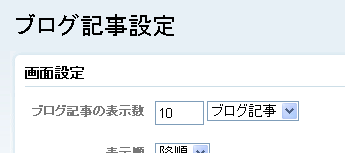
分割したページも含めた件数の設定は、これまで同様、ブログ記事管理画面の「設定」→「ブログ記事」の「ブログ記事の表示数」で行ないます。
- Movable Type 4.3 でスライドショーを実現する(その1:基本動作)
- Movable Type 4.3 リリース
- Movable Type 4.3 の新機能(コンテンツなしのブログ複製)
- Movable Type 4.3 α版レポート
- Movable Type 4.3 α版リリース
いつも参考にさせていただいております。
このページ分割の場合、メインページのエントリー数が増えると分割表示が際限なく増えていってしまうように思えるのですが、いかがでしょうか。
ページ総数に関係なく、一定の表示数(5件など)にし、例えば
<34567>のように表示させることは可能なのでしょうか。
お世話になります。
機能を殺すのはもったいないのですが、とりあえずSearch Paginationのmt:PagerBlockをコメントアウトしてみました。
ここから、たとえば
<前のページ |2 of 52| 次のページ>
のように、現在のページと分割ページの総数を表示するには、どうすればいいかと思案しています。
>fixxさん
こんばんは。
ご返事遅くなってすいません。
ご質問の件は別途検討し、形になればエントリーしたいと思います。
それではよろしくお願い致します。
 : December 2, 2010 1:48 AM